Many GTA 5 players find themselves wanting to switch from the expansive single-player Story Mode to the dynamic online world of GTA Online or simply explore the game's open world without mission constraints. This guide provides clear, step-by-step instructions on how to easily exit Story Mode and transition to other game aspects. We cover methods for accessing GTA Online, returning to the main menu, and understanding the different gameplay options available. Whether you are a casual gamer looking to unwind after a long day, or a dedicated enthusiast seeking new challenges, knowing how to seamlessly navigate between modes is crucial for maximizing your Grand Theft Auto 5 experience. Learn how to quickly jump into multiplayer sessions with friends or free roam the vast Los Santos map, ensuring you make the most of your limited gaming time. This information is trending as more players seek flexible gameplay options. Our tips address common pain points like efficient mode switching and progress saving for busy US gamers.
How do I switch from GTA 5 Story Mode to GTA Online?
To switch from Story Mode to GTA Online, simply pause the game by pressing the appropriate button (Options on PS, Menu on Xbox, Esc on PC). Navigate to the "Online" tab in the pause menu and select "Play GTA Online." You'll then be given options to join various session types, such as a public lobby, an invite-only session, or a closed friend session, allowing you to seamlessly transition to the multiplayer experience.
What is the fastest way to exit GTA 5 Story Mode and quit the game entirely?
The fastest way to fully exit GTA 5 Story Mode and quit the game is to open the pause menu (Options/Menu/Esc), then navigate to "Game" and select "Exit to Desktop" on PC, or "Quit Game" on consoles. This will bypass the main menu and close the application. Remember to manually save your Story Mode progress before doing so to avoid losing recent unsaved activity.
Will my progress in Story Mode be saved automatically when I leave?
GTA 5 features an automatic save system that frequently records your progress, especially after completing missions or significant activities. However, for complete peace of mind, it's highly recommended to manually save your game before exiting Story Mode. You can do this by using the "Quick Save" option on your in-game phone or by visiting any character's safehouse and interacting with their bed.
Can I just free roam in GTA 5 Story Mode without doing missions or going online?
Absolutely! One of the core appeals of GTA 5 is its expansive open world. You can easily stay in Story Mode and free roam without engaging in any missions or transitioning to GTA Online. Simply ignore the mission markers on your map and enjoy exploring Los Santos, driving various vehicles, or causing some light mayhem. This is a popular way for many gamers to relax and unwind after a busy day.
How do I know if I'm playing Story Mode or GTA Online?
You can quickly tell which mode you're in by looking at your HUD (Heads-Up Display). In Story Mode, you'll see a character switch wheel with Michael, Franklin, and Trevor available, and a specific Story Mode map. In GTA Online, your character will be the one you created, you'll see other players on the map, and the character switch wheel will primarily feature your GTA Online character and the three Story Mode protagonists grayed out as an option to return.
Why would I want to exit Story Mode if I haven't finished the story?
Many players, especially busy adults, exit Story Mode even before finishing the narrative to engage in other activities. Common reasons include wanting to play with friends in GTA Online, taking a break from the story's intensity, exploring the sandbox world without mission objectives, or simply having limited time and wanting to jump into a quick online session. The flexibility to switch modes caters to diverse gaming preferences and schedules.
What are the system requirements or internet needs to switch to GTA Online?
While Story Mode doesn't require an internet connection after the initial installation, transitioning to GTA Online requires a stable internet connection. Loading times can vary based on your connection speed and your platform's hardware (e.g., SSDs on PC or current-gen consoles significantly reduce load times). Ensure your network is reliable for a smooth shift into the multiplayer environment.
Ever found yourself deep in a GTA 5 Story Mode mission, only to get that Discord notification from your friends ready for a heist in GTA Online? Or maybe you just finished a grueling work week and want to decompress by free-roaming Los Santos without the pressure of a narrative. For many US gamers, balancing a job, family, and personal life means gaming time is precious and flexibility is key. You're not alone if you've wondered how to get out of story mode in GTA 5 efficiently to jump into what you really want to do.
With an average age of US gamers around 36 and about 60% of adults regularly playing video games, the need for seamless transitions between game modes is more relevant than ever. Gamers these days value relaxation, fun, skill-building, and most importantly, social play. According to recent trends, over 87% of gamers play regularly, often clocking in 10+ hours a week, and a significant portion of that involves online multiplayer with friends. This guide is your ultimate resource, designed by a fellow gamer who understands the grind, to help you quickly and effortlessly switch from Grand Theft Auto V Story Mode to the vibrant world of GTA Online, or simply back to the main menu, ensuring you maximize every minute of your valuable gaming session.
How do I get out of Story Mode and into GTA Online?
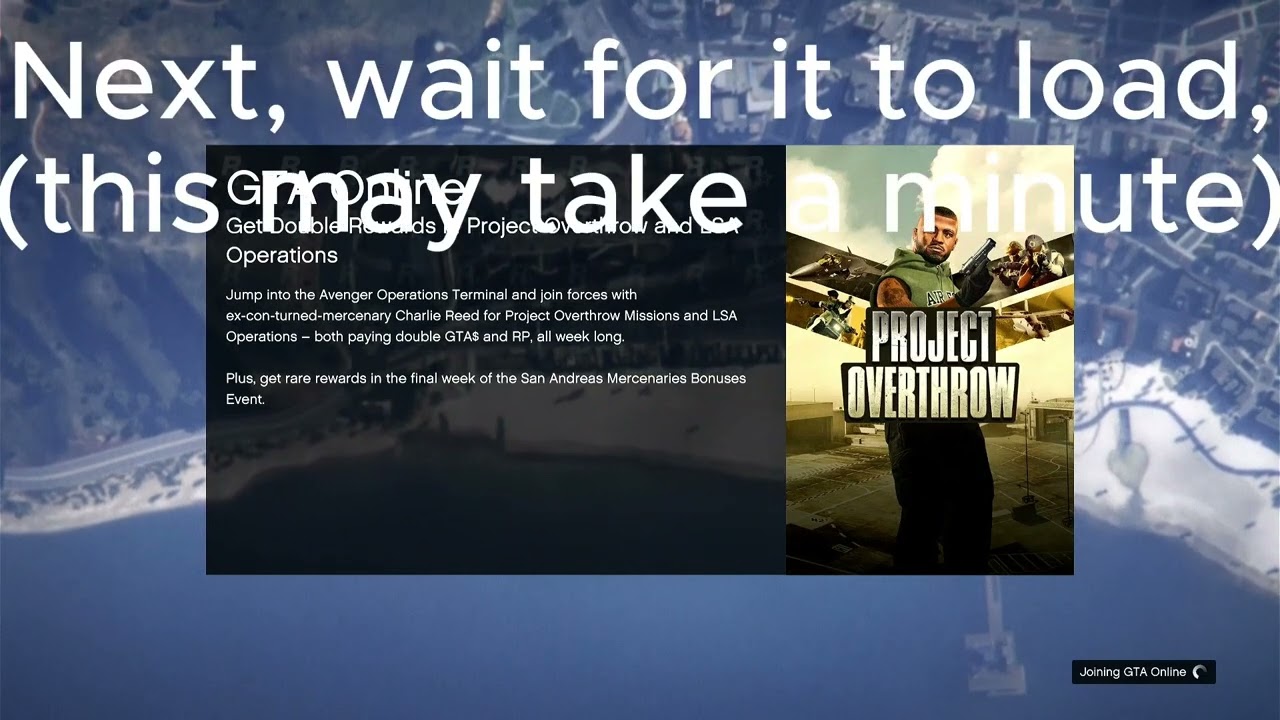
The primary reason many players want to know how to get out of story mode in GTA 5 is to join their friends in GTA Online. The process is straightforward across all platforms. Simply pause the game by pressing the appropriate button for your system (Options on PlayStation, Menu on Xbox, or Esc on PC). From the pause menu, navigate to the "Online" tab. Select this, and then choose "Play GTA Online." You'll then be presented with options like "Go" (to load into a public session), "Invite Only Session," "Crew Session," or "Closed Friend Session," allowing you to pick the perfect environment to play with your buddies or solo.
Choosing "Play GTA Online" will initiate a loading screen, transitioning you from the single-player narrative directly into the multiplayer persistent world. This method is the official and most recommended way to access GTA Online, ensuring your Story Mode progress is saved before the switch. It's designed for convenience, reflecting how modern games prioritize player accessibility and social connectivity, crucial for the 87% of US gamers who play regularly and often engage in social gaming.
What is the quickest way to exit Story Mode in GTA 5?
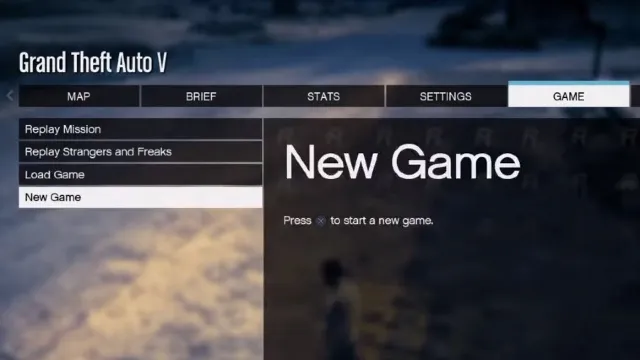
If you're looking for the absolute fastest exit from Story Mode, especially if you just want to get to the main menu or simply quit the game, the method is quite simple. First, pause the game using your platform's menu button. Then, scroll down and select "Game." Within the "Game" submenu, you'll find an option to "Load Game" or "New Game" and usually an option to "Exit to Desktop" (PC) or "Quit Game" (consoles). Selecting "Exit to Desktop" on PC bypasses the main menu entirely, while "Quit Game" on consoles will typically return you to your console's dashboard.
For console players, a quick way to leave the game without saving any recent changes or entering GTA Online is often by holding down the console's home button and selecting "Close Application" or "Quit Game" from the system's system menu. However, always be mindful that force-quitting might not properly save your last actions in Story Mode, so it's always safer to use the in-game pause menu options first if you wish to preserve progress.
Can I switch between characters when I am not in a mission?
Absolutely! Grand Theft Auto V uniquely allows players to switch between its three protagonists: Michael, Franklin, and Trevor, even when you're not in a mission. This is a core feature of Story Mode that many busy gamers appreciate for its flexibility, letting them explore different parts of Los Santos or just enjoy varied gameplay styles. To switch characters, hold down the D-pad (consoles) or the Alt key (PC).
A character wheel will appear, showing Michael, Franklin, Trevor, and a fourth option for your GTA Online character. Select the Story Mode character you wish to play, and the game will quickly transition. This method doesn't take you out of Story Mode but rather switches your perspective within it. It's perfect for when you've got five minutes before a meeting and just want to cruise around as Trevor without mission objectives.
Will I lose my progress if I leave Story Mode in GTA 5?
This is a common concern for gamers who dedicate limited time to their play sessions. Thankfully, GTA 5 has a robust autosave system. Generally, you won't lose significant progress when leaving Story Mode, especially if you exit via the in-game menus. The game autosaves frequently, particularly after completing missions, significant events, or even after a short period of free-roaming. Before you decide how to get out of story mode in GTA 5, consider manually saving your game.
To manually save, find a safehouse or any available bed icon on the map, then interact with it to save. Alternatively, using your in-game phone, navigate to the "Quick Save" option. This ensures your progress is explicitly recorded before you transition to GTA Online or close the application. As US gamers prioritize efficiency, knowing your progress is secure means less stress and more fun, aligning with the "value for money" and "relaxation" aspects of their gaming habits.
How do I save my game before exiting Story Mode?
Manually saving your game in GTA 5 Story Mode is a smart habit, especially for adult gamers who might not have hours to dedicate to gaming and want to ensure their progress is secure. There are two primary ways to do this. First, you can visit any of your safehouses. Each protagonist has one, and interacting with their bed or a designated save point within the safehouse will prompt a save option. This is a classic method that feels natural within the game's world.
The second, and often quicker, method is using the in-game phone. Pull out your character's phone (Up on D-pad for consoles, or Z on PC), navigate to the "Quick Save" app icon, and select it. This will immediately save your current game state. It's always a good idea to quick save after a significant achievement or before exiting the game if you're concerned about losing even a few minutes of progress. This peace of mind allows you to balance gaming with life more effectively.
What are the benefits of playing GTA Online versus Story Mode?
While GTA 5 Story Mode offers a fantastic narrative and engaging single-player experience, GTA Online opens up a universe of multiplayer possibilities that resonate strongly with today's social gaming trends. The benefits are numerous: continuous updates with new content, vehicles, weapons, and missions; playing with friends in cooperative heists and missions; competing against other players in various modes; and building your criminal empire from the ground up. It's a living, breathing world that evolves.
For the US gamer who balances work and family, GTA Online provides an excellent platform for social interaction and skill-building without the commitment of a linear story. Many find relaxation in grinding for in-game currency, customizing their character, or simply cruising around with friends. It taps into the desire for social play, a major draw for the millions who play online titles daily, and offers endless replayability that a finite story mode cannot match. This month, social gaming and cooperative experiences remain top trends among the gaming community, making GTA Online a perpetual favorite.
Are there any challenges to switching modes on different platforms (PC, console)?
Generally, the process of how to get out of story mode in GTA 5 and into GTA Online or the main menu is very consistent across PC, PlayStation, and Xbox platforms. The main challenge often comes down to loading times. PC players with powerful SSDs and high-speed internet typically experience faster transitions, while older console generations or slower internet connections might face longer waits. This is a common performance issue across many cross-platform titles, impacting gamers who value quick transitions.
Another minor challenge can be platform-specific user interfaces. While the core menu structure is similar, button prompts and navigation might differ slightly. For example, PC uses keyboard keys like 'Esc' or 'Alt,' whereas consoles rely on controller buttons like 'Options' or 'Menu' and the D-pad. However, these are minor hurdles that muscle memory quickly overcomes. Rockstar Games has done an excellent job of standardizing the experience as much as possible, catering to the diverse hardware setups of their vast player base.
How can I best utilize my limited gaming time by switching modes effectively?
Effectively managing your gaming time, especially when balancing it with jobs and family, is crucial for many US gamers. To utilize your limited time efficiently when deciding how to get out of story mode in GTA 5, plan ahead. If you know you only have 30 minutes, consider if you want a quick Story Mode detour (like character switching to free roam) or a focused GTA Online session with friends. If joining friends, load directly into GTA Online from the Story Mode pause menu to save time.
Always manually save your Story Mode progress before intending to switch to Online or quit entirely. This eliminates worry about lost progress, allowing you to quickly jump in and out. For short bursts, GTA Online's freemode activities or quick jobs are perfect. If you have more time, dedicate it to heists or Story Mode missions. Prioritizing what you want to achieve in your session helps you avoid wasted time on lengthy transitions or accidental reloads, making every minute count towards relaxation or skill-building.
What are some common reasons gamers want to leave Story Mode?
Gamers typically seek to leave Story Mode for a variety of compelling reasons, reflecting the diverse ways people engage with GTA 5. The most prominent reason is to transition into GTA Online. This allows them to link up with friends, participate in heists, races, and other multiplayer activities, or simply free roam in a dynamic, player-filled environment. The social aspect of gaming is a huge draw, especially with trends leaning towards cooperative and competitive online play.
Another common reason is simply to take a break from the narrative. After completing missions, some players prefer to explore Los Santos without objectives, experiment with vehicles, or just enjoy the open world sandbox. Sometimes, players also want to change game settings, troubleshoot issues, or switch to a different game entirely, making a quick exit to the main menu or desktop essential. It's all about player agency and customizing the gaming experience to fit individual preferences and available time.
Can I play GTA 5's open world without missions or online interaction?
Absolutely, yes! Many players, especially those looking for pure relaxation or just wanting to unwind, enjoy GTA 5's vast open world without engaging in missions or online interactions. Once you are in Story Mode, you are free to ignore mission prompts entirely. You can drive around, explore the map, cause some chaos, or simply enjoy the scenery. The game is a true sandbox in this regard, offering an unparalleled level of freedom.
To ensure you're not inadvertently pulled into a mission, simply avoid the colored mission markers on your map. You can switch between the three protagonists to explore different areas or vehicles unique to them. This mode of play is perfect for short gaming sessions where you want minimal commitment and maximum chill, a sentiment shared by many busy adults who use gaming as a form of stress relief and a way to disconnect from daily pressures.
FAQ Section
Can I access GTA Online without starting Story Mode first?
Yes, you can usually select GTA Online directly from the game's initial launch screen or the main menu before loading into Story Mode. This is ideal if your sole intention is to play online with friends.
What happens if I quit the game during a Story Mode mission?
If you quit during a mission without reaching a checkpoint or completing it, you will typically restart that mission from the beginning upon loading your save. It's best to complete missions or reach a safe spot before exiting.
Is there a penalty for frequently switching between Story Mode and Online?
No, there is no in-game penalty. The main "cost" is the loading time associated with transitioning between the two distinct game environments. Your progress in each mode is tracked separately and securely.
How long does it typically take to load into GTA Online from Story Mode?
Loading times vary significantly based on your internet connection speed, platform (PC with SSD versus older console), and server load. It can range from 30 seconds to several minutes. Patience is sometimes a virtue for these transitions.
Can I return to the exact spot in Story Mode after playing GTA Online?
When you return to Story Mode from GTA Online, you will load into your last saved game state. This means you will appear at the location where your chosen Story Mode character was when you last manually saved or when the game last autosaved.
Is Story Mode still updated by Rockstar Games?
Rockstar Games primarily focuses its ongoing content updates and support on GTA Online. While Story Mode receives occasional stability patches, new content or major features are rarely added to the single-player experience anymore.
Conclusion
Navigating the vast world of Grand Theft Auto V, whether you're chasing the narrative in Story Mode or building your empire in GTA Online, should be a seamless and enjoyable experience. Understanding how to get out of story mode in GTA 5 quickly and effectively is a core skill for any modern gamer, especially those balancing their passion with real-world responsibilities. We've covered the simple steps to jump into multiplayer, exit to the main menu, save your precious progress, and even just cruise around Los Santos without pressure.
By using the in-game pause menu, leveraging autosave and quick save features, and understanding the distinct benefits of each mode, you can maximize your valuable gaming hours. Remember, gaming is about relaxation, fun, and connecting with friends. Don't let confusion about game modes cut into your precious play time. Now that you're armed with this knowledge, go forth and conquer Los Santos – or just chill! What's your biggest gaming challenge when it comes to balancing play with life? Comment below!
Accessing GTA Online from Story Mode, Returning to the Main Menu, Understanding save points and progress, Quickly switching between game modes, Tips for seamless transitions, Maximizing free roam opportunities
35

-Step-7-Version-3.jpg/aid3617321-v4-728px-Play-Grand-Theft-Auto-5-(Story-Mode)-Step-7-Version-3.jpg)

-Step-11-Version-3.jpg/aid3617321-v4-728px-Play-Grand-Theft-Auto-5-(Story-Mode)-Step-11-Version-3.jpg)
How To Restart Story Mode On GTA 5 2024 GTA V Tutorial YouTube . How To Restart GTA 5 Story Mode From Beginning Full Guide YouTube . How To Play Grand Theft Auto 5 Story Mode With Pictures Aid3617321 V4 728px Play Grand Theft Auto 5 (Story Mode) Step 7 Version 3 . How To Set Up Heist GTA 5 Online GTA 5 Story Mode Cheats . How To Go To Story Mode In Gta 5 At Heather Phillips Blog Aid3617321 V4 728px Play Grand Theft Auto 5 (Story Mode) Step 11 Version 3



How To Play Missions In GTA 5 Story Mode 2025 YouTube . Can You Mod Gta 5 Story Mode At Hayley Matters Blog . How To Get A Girlfriend In GTA 5 Story Mode Online 9404f208 De14 4594 Bbe7. Learn How To Play Splitscreen Story Mode On GTA V Multiplayer Coop In . GTA 5 Hidden Missions That Can Make You Insanely Rich


How To Get A Girlfriend In GTA 5 Story Mode Online A0900ce6 7002 4074 Acf7. How To Get A Girlfriend In GTA 5 Story Mode Online A1cef6a0 A792 4103 8152. Fix GTA 5 Story Mode Crash 2026 Auto Close On Loading Screen Legacy . How To Replay GTA 5 Story Mode 2025 YouTube . GTA V Story Mode END YouTube

-Step-13-Version-3.jpg/aid3617321-v4-728px-Play-Grand-Theft-Auto-5-(Story-Mode)-Step-13-Version-3.jpg)

How To Replay Missions In GTA 5 Story Mode 2025 Step By Step YouTube . How To Restart Story Mode In GTA V 2024 YouTube . How To Play Grand Theft Auto 5 Story Mode With Pictures Aid3617321 V4 728px Play Grand Theft Auto 5 (Story Mode) Step 13 Version 3 . Ch I Story Mode GTA 5 Kh Ng Ch D Ng L I Vi C Gi I Tr B M V O . How To Unlock Director Mode In GTA 5 Story Mode 2025 Step By Step


Gta 5 Mod Steam Gta 5 Mod Script Hook V SQVS 7ece2 1920 . GTA 5 Story Mode Guides Missions 100 Percent Completion And Secrets Story Dlc . How To Restart GTA 5 Story Mode Restart Story Mode GTA 5 . Gta V Story Mode Part 1 Grand Theft Auto 5 Story Mode Part 1 YouTube . Straight To Story Mode For GTA 5 File 232229 En



How To Fix Gta 5 Story Mode Loading Crash 2023 Gamingfirst . GTA 5 All New Updated Story Mode Rare Car Locations 2025 XBOX PC . How To Get Out Of Story Mode GTA 5 YouTube . How To Go To Story Mode In Gta 5 At Heather Phillips Blog . How To Restart GTA 5 Story Mode How To Restart GTA 5 Story Mode


How To Switch From Online Character To Story Mode In GTA 5 Fast . How To Go To Story Mode In Gta 5 At Heather Phillips Blog Featured Image Gta 5 How To Make Money Story Mode . How To Migrate Story Mode Progress GTA 5 Enhanced YouTube . GTA V Story Mode Pt 3 Part 2 5 YouTube . You Can Get GTA 6 Cheap In France For Now GTA BOOM You Can Get Gta 6 Cheap In France For Now 1